ChatGPT already talks about your business. The only question is whether it’s working from facts you control or from whatever it scraped together.
On November 10, 2026, OpenAI opened Businesses in ChatGPT in beta. Through a new Business Hub, owners can claim, verify and manage the profile ChatGPT shows for their business, much like a Google Business Profile.
If your buyers are using AI to find local businesses, products and services (they are), this is the next listing you need to own. Here’s exactly how to do it, step by step.
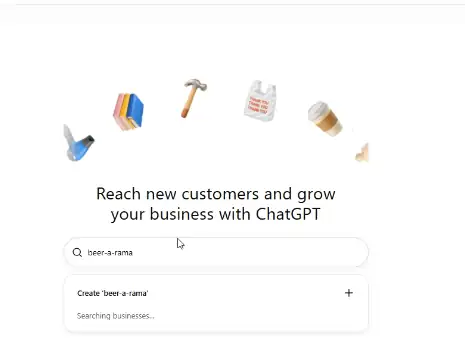
Step 1: Find and Claim Your Business
- Go to chatgpt.com/business-hub.
- Sign in to your ChatGPT account, or create one.
- Search for your business name in Business Hub.
- Select your business from the listings.
- Confirm you’re the owner or an authorized representative.
- Start the claim and verification process.
Step 2: Confirm Your Business Information
Before you claim, make sure you’ve got the right listing. Have this ready:
- Official business name
- Physical business address
- Business phone number
- Business email address
- Website URL
Every one of these should match your website and your Google Business Profile exactly. Inconsistent details are how AI tools get your business wrong.
Step 3: Verify You Own the Business
ChatGPT offers a few ways to prove you’re authorized to manage the business. Which ones you see can vary.
Phone verification
Choose the business phone option. ChatGPT sends a code by text or automated call. Enter it to confirm ownership.
Email verification
Choose the business email option. A code goes to the email tied to your business. Enter it to continue.
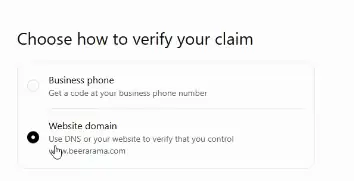
Website domain verification
If you can access your domain’s DNS settings, you can verify by adding a TXT record:
- Select the website domain option.
- Copy the TXT record ChatGPT gives you.
- Log in to your domain registrar or DNS provider.
- Add the TXT record exactly as provided.
- Go back to ChatGPT and select Verify domain.
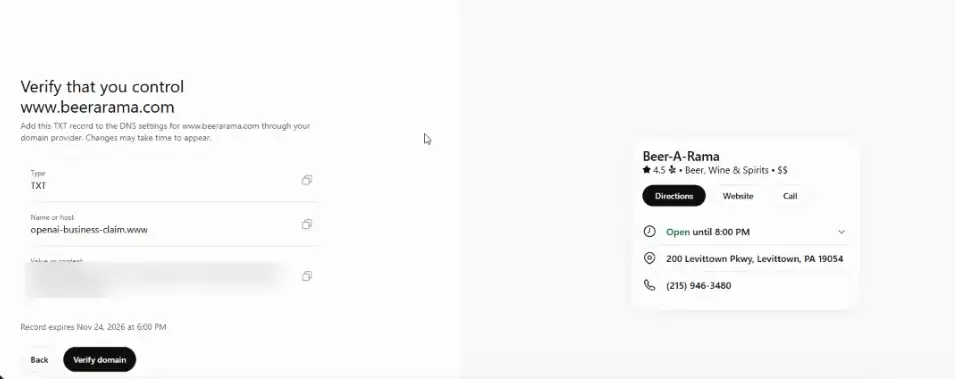
DNS changes can take a while to go live. Shopify merchants may also be able to verify through their Shopify account.
Once you finish this step, OpenAI reviews your claim and emails you a decision.
Step 4: Complete Government ID Verification
Claim approved? You’re not done. You also need to verify your identity through Persona, OpenAI’s identity verification provider.
- Open your claimed business in Business Hub.
- Select Verify with Persona.
- Click Continue to Persona.
- Follow the on-screen instructions.
- Submit the requested ID and supporting information.
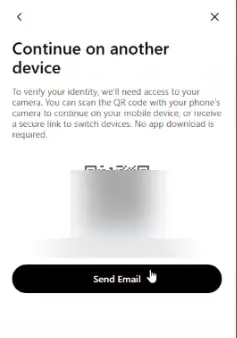
You may be asked for a government-issued ID, business registration details, or proof that you’re authorized to represent the business. OpenAI reviews it and lets you know when you’re approved.
Step 5: Complete and Optimize Your Profile
After verification, go back to Business Hub, select your business and open Edit Business Details. If you’ve managed a Google Business Profile, this will feel familiar.
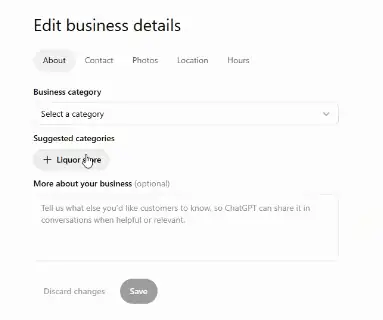
About
Write a clear description of what you do, what you offer and what makes you different. Pick the most accurate business category and add your website.
Contact
Check your NAP (name, address, phone number). It should match your website, Google Business Profile and every directory you’re listed in.
Photos
Upload clear, current images that actually represent the business:
- Company logo
- Cover photo
- Storefront or office
- Products
- Team or service photos
Location
Confirm your physical address and any other location details.
Hours
Enter your regular hours and update them when they change.
Review every section before you finish. Profile changes go through OpenAI review and may not show up right away.
Step 6: Give Your Team or Agency Access
You don’t have to manage this yourself. Once the business is claimed, the account admin can invite team members or an authorized marketing agency through Business Hub.
- Open your business in Business Hub.
- Find the team or access management options.
- Invite the person or agency who’ll help manage the profile.
- Follow the prompts to grant the right access.
- Have them accept the invite from their own ChatGPT account.
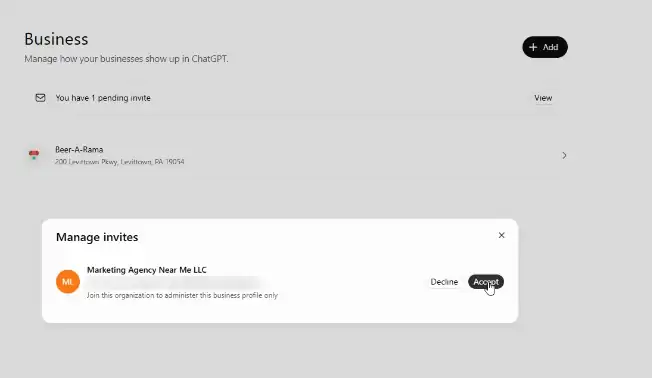
Your marketing team can maintain the profile without anyone sharing your personal ChatGPT login. Invite options and permissions may vary depending on the account or workspace used to claim the business.
Step 7: Keep It Updated
Claiming the profile is the start, not the finish. Make it part of your regular marketing maintenance:
- Update hours and contact info whenever they change.
- Keep your description, products and services current.
- Refresh photos as the business evolves.
- Check Business Hub insights, including mentions and website clicks.
The Bottom Line
ChatGPT business profiles are the next step in how buyers find businesses. The companies that learned to manage their Google Business Profile early won the map. This is the same opportunity, earlier in the curve.
One honest caveat: claiming and optimizing your profile does not guarantee ChatGPT will recommend you or rank you higher. What it does do is put the facts on your ChatGPT profile in your hands instead of leaving them to chance.
Ready to start? Head to chatgpt.com/business-hub.